Every Patient, One Clear Queue
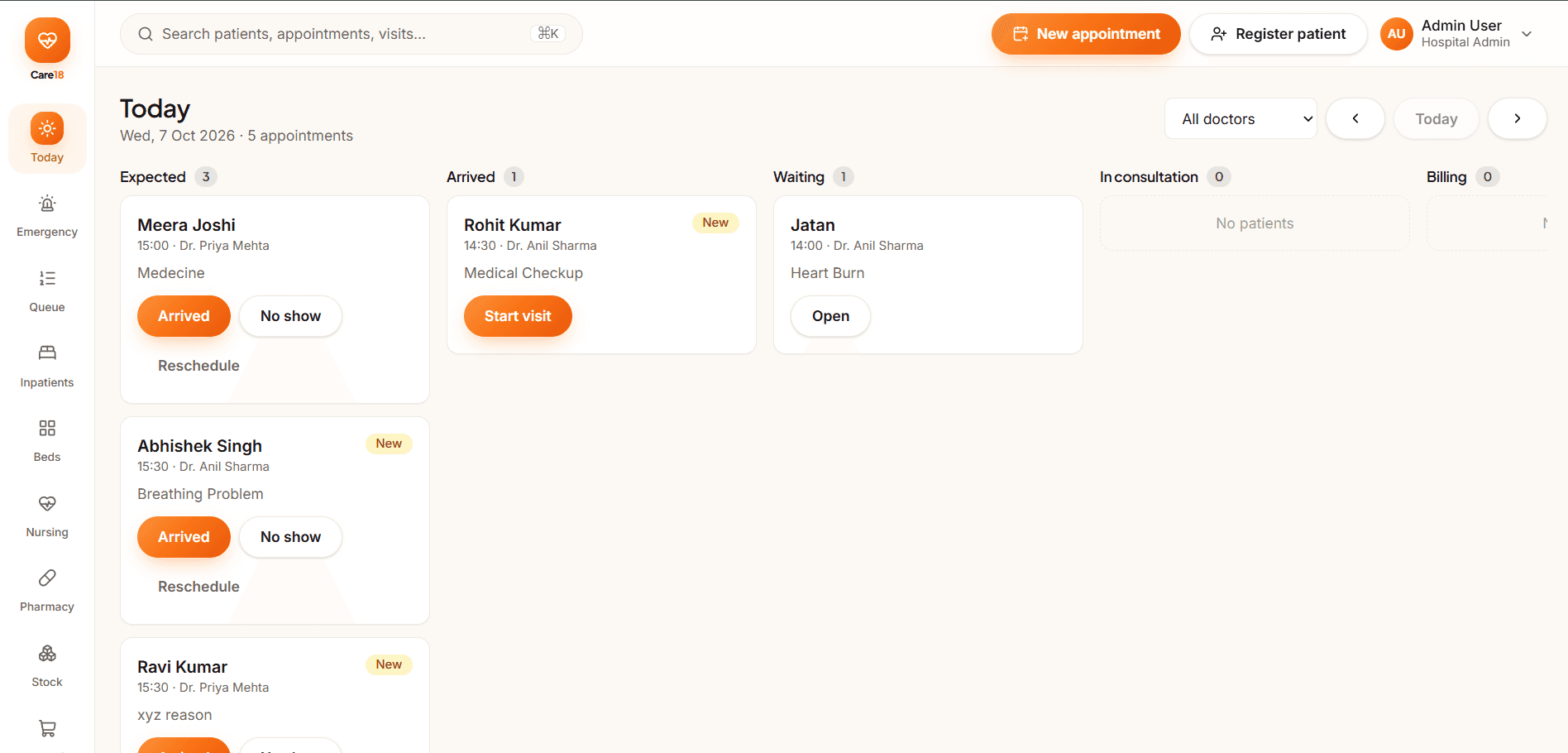
Care18 turns the OPD rush into a visible, orderly flow. Patients move through Expected, Arrived, Waiting and In consultation lanes on one live board, so reception, doctors and nurses always know who is next, what they are waiting for, and where each visit stands.
- Live lanes from Expected to Completed
- Ticket-based OPD flow
- Walk-ins and appointments together
- No show tracking
What is Queue Management in Care18?
Queue Management in Care18 gives the front desk, nursing station and consulting rooms one shared view of every patient's position. Each visit gets a ticket and moves through defined lanes — Expected, Arrived, Waiting, In consultation, Investigation, Treatment, Billing and Completed — with No show recorded when an appointment is missed. Walk-ins join the same lanes as booked appointments, so staff plan the day from a single board instead of paper lists and verbal updates.
- Ticket issuance for appointments and walk-ins at registration
- Live lanes: Expected, Arrived, Waiting, In consultation
- Downstream lanes for Investigation, Treatment, Billing and Completed
- No show marking keeps the day's list honest
- Role-based views for reception, doctors and nursing staff
Key Benefits
Orderly OPD Flow
Every patient sits in a visible lane, so the front desk answers who is next instantly instead of guessing from paper lists.
Fewer Lost Patients
Arrived, Waiting and No show statuses keep the day's list accurate, preventing patients from being missed or called out of turn.
Balanced Doctor Load
Reception can see which lanes are backing up and redistribute walk-ins or appointments before queues build at a single room.
Clear Handovers
Investigation, Treatment and Billing lanes pass patients between departments with context intact, so nothing stalls between clinical and billing teams.
Key Features
Ticket-Based OPD Flow
Issue a token at registration and follow it from arrival to completion, whether the visit was booked in advance or walked in.
Live Status Lanes
Expected, Arrived, Waiting, In consultation, Investigation, Treatment, Billing and Completed lanes update as staff move patients along.
Walk-ins and Appointments Together
Booked patients and walk-ins enter the same board with clear markers, so reception can plan around both without keeping two separate lists.
No Show Handling
Mark missed appointments as No show to release the expected slot, keep counts honest and support follow-up calls from the front desk.
Doctor & Room Views
Each consulting room sees its own queue with patient order, lane and visit context, keeping focus during consultations and reducing interruptions.
Queue Dashboards
Ward and OPD leads watch lane depths and waiting patterns to decide staffing and room allocation during the clinic session.
Queue Workflow in Care18
From registration to completion, every visit moves through visible lanes that all teams share.
- 01
Register & Issue Ticket
Reception creates or finds the patient record and issues a queue ticket for the day's consultation.
- 02
Patient Arrives
Arrival is marked at the desk, moving the ticket from Expected to Arrived on the live board.
- 03
Waiting & Consultation
The patient waits in the Waiting lane and is called in, moving the ticket to In consultation.
- 04
Investigation & Treatment
Orders and procedures move the ticket through Investigation and Treatment lanes with status visible to all.
- 05
Billing & Completion
The visit reaches Billing then Completed, with No show recorded if a booked patient never arrives.
Security Built Into Every Layer
Hospital data deserves enterprise-grade protection. Care18 is designed with security at its core — access control, encryption, auditability and recoverability.
Role-Based Access Control
Every user sees only what their role permits, down to the field and report.
Encrypted Data
Encryption in transit and at rest for records, attachments and backups.
Audit Trails
Immutable, timestamped logs of who changed what, when and from where.
Secure Authentication
Password policy, multi-factor options and session control for sensitive actions.
Cloud Backups
Automated, encrypted backup schedules with retention policies you control.
Disaster Recovery
Documented recovery procedures, standby infrastructure and restore testing.
Who Benefits
Busy OPD Departments
Keeps high-volume outpatient clinics moving with one board for multiple consulting rooms and specialties across the department.
Walk-In Counters
Handles unplanned arrivals alongside the appointment book, so reception never runs two separate lists for the same doctors.
Follow-Up Desks
Manages return patients who arrive without appointments by slotting them into the live lanes quickly and clearly.
Multi-Doctor OPD Days
Shows which rooms are free, which lanes are long and where staff should direct the next patient.
Related Modules
Explore other modules that work seamlessly with this solution
Frequently Asked Questions
See the Queue in Motion
Book a free demo and watch a live OPD day flow from Expected to Completed on the Care18 queue board.